
Insights · November 12, 2026
Your Smart Home Has Outgrown Mesh WiFi
By Chris Worthington · Personal Technology, Alhambra
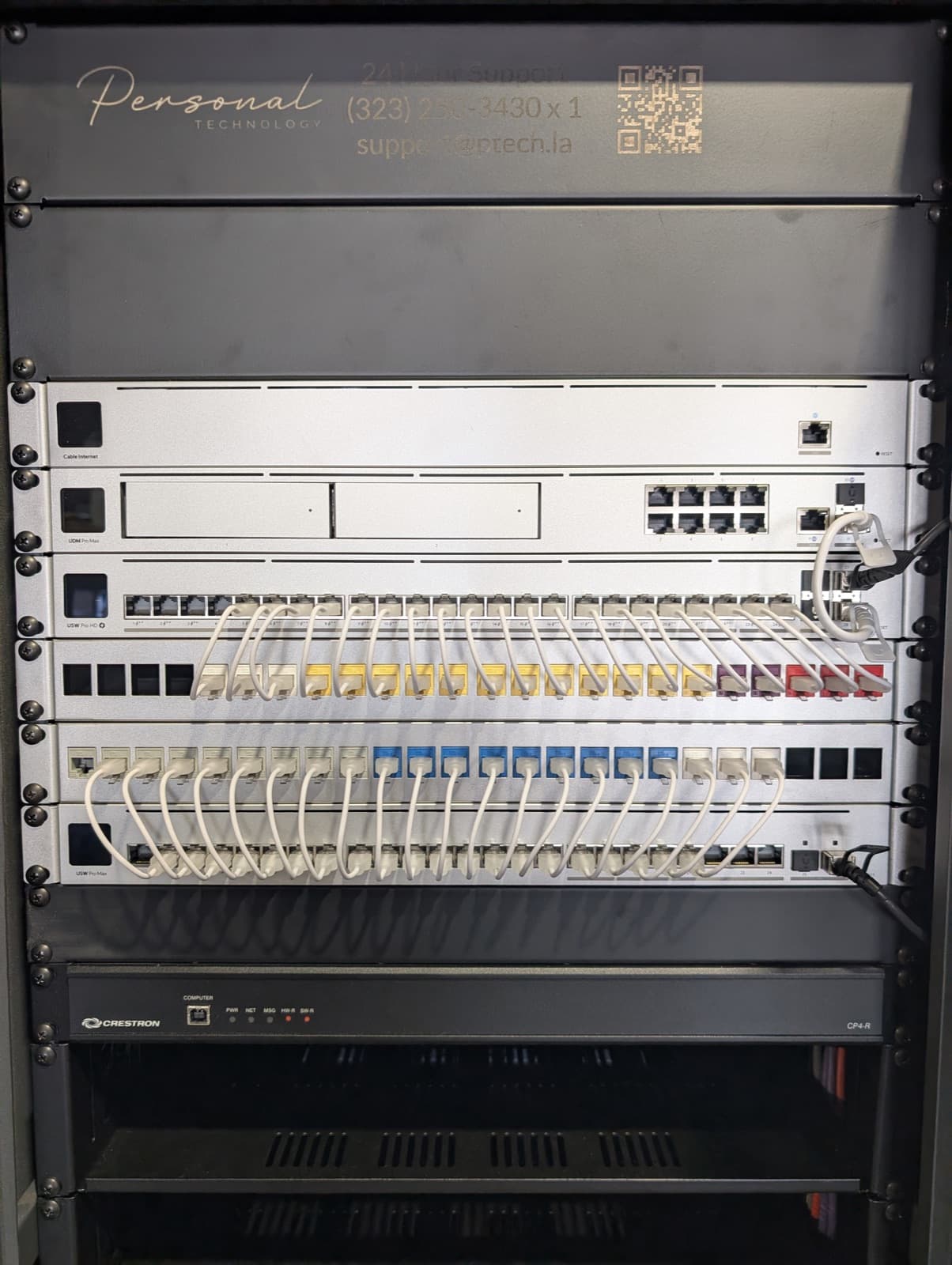
Most homes get their network the same way: a box from the internet provider, and when the back bedroom drops out, a mesh kit from the store. For email and a couple of streaming TVs, that works. But the homes we work in ask far more of the network than that, and a network in a box was never built to carry it.
What's riding on your network now
Ten years ago the network carried laptops and phones. Today it carries the house.
Lighting control, whole-home audio, the control system and its touch panels, security cameras, the doorbell, gates, thermostats, shades, and the TVs all depend on it. So do the video calls you take from the home office and the homework your kids turn in at night. A typical home we work in has well over a hundred connected devices.
When the network struggles, it rarely announces itself. Instead, the lights respond a beat late, the music drops in one room, a camera goes offline, or the remote stops talking to the TV. It looks like the lighting or the audio is broken. More often than not, it's the network underneath.
How mesh works, and where it falls short
A mesh system puts several small routers around the house and has them pass your traffic to each other over the air. That's what makes it easy to install: nothing has to be wired. It's also its biggest weakness.
Every time traffic hops from one mesh node to the next wirelessly, the node has to use its own radios for two jobs at once: talking to your devices and talking to the next node. Speed drops with each hop, and the room farthest from the main unit gets the least.
Mesh nodes also end up where there's an outlet and a shelf, not where the coverage is needed. And they have to reach each other through whatever the house is made of. Lath-and-plaster walls in older Pasadena homes, and stone, steel, and concrete in newer ones, absorb exactly the signal mesh depends on. Detached guest houses, pool houses, and garages are often out of reach entirely.
The result is a system that tests fine standing next to the main unit and falls apart in the places you actually use.
What an engineered network does differently
In a network we design, every access point has its own cable back to a central switch. Nothing is relayed through the air, so every access point delivers full performance, whether it's in the kitchen or the far end of the property.
Because the cable carries both data and power, access points go on ceilings and walls where the floor plan needs them, not where an outlet happens to be. We plan their placement around how the house is built and how you live in it, including the patio, the yard, and the outbuildings.
The access points work together as one system. As you walk through the house on a call, your phone hands off to the nearest access point instead of clinging to a weak one two rooms away. And everything that doesn't move, like TVs, the audio system, the control system, and cameras, connects by cable whenever possible, which keeps the wireless clear for the devices that need it. The network also knows what matters most: video calls, the alarm, and the control system get priority, so a big download in one room doesn't freeze a call in another.
Security is the difference most people never see
Your network is part of your home's security. The alarm, the cameras, the door locks, and the gate all communicate over it. Yet most consumer networks are flat: the laptop with your banking, the guests' phones, and a dozen inexpensive smart gadgets share one network. If one gadget has a weakness, everything else is exposed to it.
A properly engineered network protects you on three fronts. The wireless uses current encryption, so nobody parked out front can get on. A business-grade firewall watches what comes in from the internet and blocks intrusion attempts. And cameras, smart devices, guests, and your own computers each live on their own segment, so a cheap plug can't reach your alarm or your personal devices.
Management matters too. Consumer gear is often set up once and never touched again, with firmware that stops getting updated and passwords nobody remembers. We monitor the networks we install, keep them updated, and can see problems, often before you notice them.
The problems we're usually called about
When a homeowner calls us about their WiFi, it's almost always one of these:
- Video calls freeze or drop when they move from one room to another.
- The back bedroom, the patio, or the guest house never has a usable signal.
- Smart devices go offline at random and have to be reset.
- Cameras buffer or miss recordings.
- The internet provider's router and the mesh kit are fighting each other.
- Nobody knows the admin password.
Almost all of these trace back to the same causes: wireless backhaul, poor placement, a flat network, and nobody looking after it.
What about smaller homes?
Mesh can get a small home online. But even smaller homes now have dozens of connected devices, and the ones that matter most are often the ones nobody checks until they fail.
When the alarm drops off the network, the cameras stop recording, or the sprinklers miss a week of watering, that's a real problem, whatever the size of the house. A network built for those systems is worth it in any home that depends on them, and essential in one that's large, built of materials that block signal, or spread across several buildings.
New build or existing home
In a new build or a major remodel, cabling goes in before the drywall, which is the cleanest and most reliable way to do it. Our prewire article covers what belongs in the walls at that stage.
In an existing home, we plan around what's already there: existing cable, attic and crawlspace access, and the places where a neat surface run beats opening a wall. The goal is a network that performs as if the house had been prewired for it.
The next step
If your network is the weak link in an otherwise well-built home, the place to start is a walkthrough. We look at the house, where coverage dies today, and what the network has to carry, and design from there.